
Target 260A® ABS Enclosure

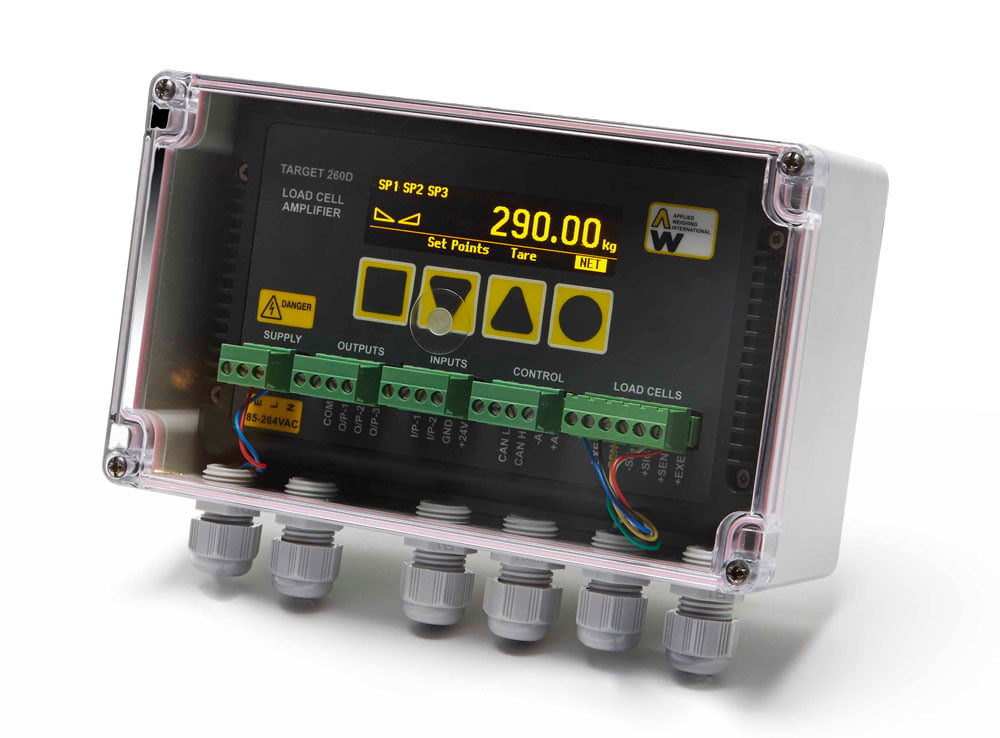
The Target 260A® is a high precision load cell amplifier with weight display. It offers a choice of communication interfaces for most industrial weighing applications.

The Target 260A® is housed in an ABS surface mounting enclosure with optional clear lid.

The simple keypad allows for easy set-up, with all settings stored in memory.

The Target 260A® is supplied as standard with 3 configurable volts free outputs and 2 digital inputs for control.

 

Features

  • High precision weighing amplifier with 24 bit resolution.
  • 10-32vdc or 110-240vac power supply models.
  • ABS surface mounting enclosure with optional clear lid.
  • OIML R76 for Weights and Measures applications.
  • Real time clock.
  • 3 volts free relay contact outputs and 2 configurable digital inputs.
  • Bright OLED display for easy viewing in all light conditions.
  • Capability to monitor and alarm individual load cell faults including out of range, out of balance and cable break faults via the on board CAN BUS interface when used in conjunction with the AW190 Intelligent Load Cell Junction Box.
  • Analogue output card – fitted as standard.
  • Designed and manufactured in the UK.

Options/Accessories

  • Target 260A Load Cell Amplifier, Enclosure type- DC version
  • Target 260A Load Cell Amplifier, Enclosure type- AC version
  • Optional Ethernet TCP/IP Output Card
  • Optional Profibus Output Card
  • Optional Ethernet IP Output Card
  • Optional Profinet IRT Output Card
  • Optional EtherCAT Output Card
  • Optional Modbus TCP Output Card
To order, or find out more about this product, fill in the form here or call 0118 946 1900
File Version Size Download
Manuals
Analogue Card Datasheet Issue 1 647 KB Download
Ethernet TCP Card Datasheet Issue 1 2 MB Download
Profibus Card Datasheet Issue 1 2 MB Download
Ethernet IP Card Datasheet Issue 1 2 MB Download
Profinet IRT Card Datasheet Issue 1 2 MB Download
EtherCAT Card Datasheet Issue 1 1 MB Download
Modbus Card Datasheet Issue 1 2 MB Download
Analogue Option Card Manual Issue 3 619 KB Download
Ethernet TCP Manual Issue 4 613 KB Download
Profibus Manual Issue 8 847 KB Download
Ethernet IP Manual Issue 9 652 KB Download
Profinet IRT Manual Issue 9 642 KB Download
EtherCAT Manual Issue 6 623 KB Download
Modbus Manual Issue 6 620 KB Download
Troubleshooting Guides
Target 260 Troubleshooting Guide Issue 1 424 KB Download
Analogue Card Troubleshooting Guide Issue 1 252 KB Download
Ethernet TCP/IP Troubleshooting Guide Issue 1 301 KB Download
Profibus Troubleshooting Guide Issue 1 251 KB Download
Ethernet IP Troubleshooting Guide Issue 1 297 KB Download
Profinet IRT Troubleshooting Guide Issue 3 238 KB Download
EtherCAT Troubleshooting Guide Issue 1 297 KB Download
Modbus Troubleshooting Guide Issue 1 296 KB Download
Software
AW260 Software Enchancements 052026 n/a 371 KB Download
IP Config Setup Vers 1 1,009 KB Download
Configuration Files
AW260_00020_Profibus_GSD_Files n/a 6 KB Download
AW260_00030_Ethernet IP_EDS_Files n/a 36 KB Download
AW260_00040_Profinet_GSDML_Files n/a 55 KB Download
AW260_00050 EtherCAT Config File Vers 1 1 KB Download
Although Applied Weighing International Ltd routinely screens for viruses, addressees should check the attachments for any viruses on the download. Applied Weighing International Ltd makes no representation or warranty as to the absence of viruses in any attachments.

Frequently Asked Questions

Our engineers are strategically positioned across the UK to ensure prompt responses when needed. Customers with a service agreement benefit from preferential call-out rates and response times. For more information, please contact ServiceDesk@aw.co.uk

Load cell cables can be cut to tidy the installation. However, it is advisable to ensure that each load cell in the system has cables of similar length. This helps maintain uniform load cell sensitivities and prevents potential cornering issues.

No. Each load cell in a weighing system should have the same capacity. Using load cells of different capacities will result in varied outputs among the load cells, causing weighing errors.

The calibration frequency will depend on your system and application; also, on your ISO requirements, if any. As a standard the calibration is carried out once a year, with more frequent checks on systems and more often recalibration if necessary.

Yes, Filtering is applicable for both display values and analogue values.

If your unit has Ethernet TCP/IP option card:

Connect the Target/Status to a network. Look up the get current IP address: Menu-> Ethernet Card-> TCP/IP Info.

Open any browser on the PC connected to the same network as unit. Enter the “IP address” found from unit in the address line.

Username and password pop up will appear, enter “root” as username and “password” as password.

A new webpage should be present now. Here you can change IP address in the “Network” tab. Click on “Apply” to complete the change.


If your unit has Profinet/Ethernet IP/Modbus TCP/Profibus option card, the IP address can be modified by using IPCONFIG application.

The IPCONFIG can be downloaded from the Manuals section. Once installed, connect the Target/Status to the network.

Open IPCONFIG application and scan for devices, once scanning is completed you will see devices available in the list, select required device and can allocate Static/Dynamic IP address. Click Apply/Save.